Top Features
- Optimize Windows registry
- Best speed of all registry cleaners
- System emergency rescue
- Double engines inside Registrycleaner
- Remove thousands of registry errors
- Revert changes if there were mistake
- Make a backup file for registry
- Prevent system crashes
- Complete registry management
- Quality registry repair in minutes
- Easy to use registry cleanup tool
- Compatible with the latest Win OS
- Substitute for 'regedit' manually
Best Registry Cleaner
Registry cleaner is one of the musts you need for system maintenance. It plays as much important role as system rubbish cleaning with regards to system speed and stability. In the current information age in which various Windows systems coexist, it is the desirable and highly required that one tool can solve all kinds of registry glitches fast and securely without changing other system data. Fortunately, we've known your needs and found a registry cleaner that you can't miss! Registrycleaner offers an ideal tool for both 32-bit and 64-bit system users to manage registry on a routine basis.
As Windows users, you can never ignore the regular registry maintenance. Without a clean, slim and error-free registry, your computer will run slower and slower, pop up error messages when opening some complex programs and even crashes at some point. If these awful situations happen and are likely to be connected with your faulty registry, it's time for a complete registry repair!
There are some 64 bit registry cleaners on the market which claim to have the ability to deal with registry on 64-bit systems, however, none of them can truly realize the series operations including scanning, cleaning, redoing, backing up and recovering like Registrycleaner does! All the functions you need for registry management can be accomplished conveniently with some single clicks in a moment on Windows Xp, Windows 7 and Vista systems.
Besides its compatibility with both 32-bit and 64-bit systems, Registrycleaner exceeds its peers with the extraordinary speed. Loaded with the advanced dual engine search engines, Registrycleaner operates much faster than the other registry cleanup tools, saving your precious time and improving your working efficiency.
Since we are fully aware of the necessity of a helpful registry cleaner, why not start learning what this registry booster can offer us right now?
1. Speedy scanning
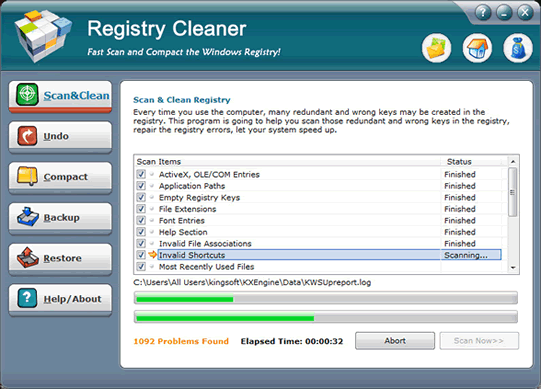
All tweaking processes start with scanning. Just like soldiers will lose their directions if they don't know where the enemies hide, we can't move on to following steps without knowing where the "bugs" lies in registry repair. Check out numerous entries stocked in the registry with a single select-all and scan click, and thousands of redundant or error files will be targeted automatically. It's worth noting that they don't just list there disorderly, instead, they are arrayed according to different search categories so as our more detail-oriented users may conduct the next step category by category. Whatever way you choose to go next, the scanning process will take you no more than a few seconds. Speedy, isn't it?
2. Secure cleaning
Thousands of entries are listed in the interface and here you can clean these wastes in two ways, the quicker and more complete way, or the slower and more secure way. The former way can be realized by just two clicks of mouse, select all items and clean. This process takes no more than a minute or two. Or if you like to do it more prudently, you can deselect some files from the list using the category feature and split the whole cleaning process into several steps. By doing in this way, the registry cleaner creates more undo files automatically for you so that any partial rollback on certain category files is easy to achieve. Whether you choose to clean all entries at a time or split them into groups, each operation will be recorded faithfully by the registry cleanup tool in case you need to undo any specific change later. Secure, isn’t it?
3. Useful compacting
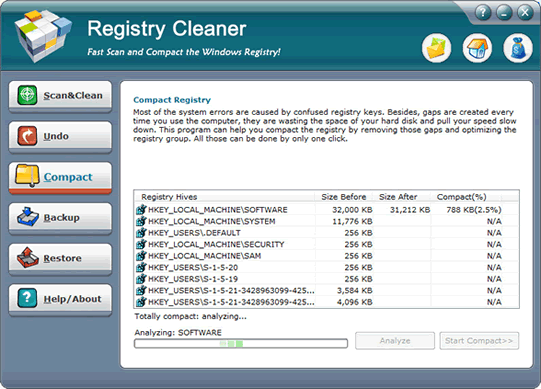
Now that your registry is free from clustered and error entries, what else can it be optimized? Fill in the gaps among entries and release extra space from them! The whole analyzing and compacting procedure will be completed pretty fast. Just don't forget to restart the computer after compacting is done. Without timely rebooting, the modification you've just made won't come into effect. Want to gain some extra space from your system? Don't miss this useful compacting feature embraced in Registrycleaner!
4. Helpful backup
Well, we've gotten rid of all the unwanted registry entries, fixed the wrong files and cut down the registry size. A perfect registry database is waving to you. We can totally understand how excited and impatient you are at this moment but would still suggest you slow down your pace before closing up the registry cleaner. As you can never know when your registry will mess up again in the future, if there's a shortcut to recover this current registry with a simple click, are you willing to spare a few minutes now? We bet your answer is yes. Backup is necessary when you prepare important working files, this makes registry backup equally important since a reliable system can't be without a healthy registry.
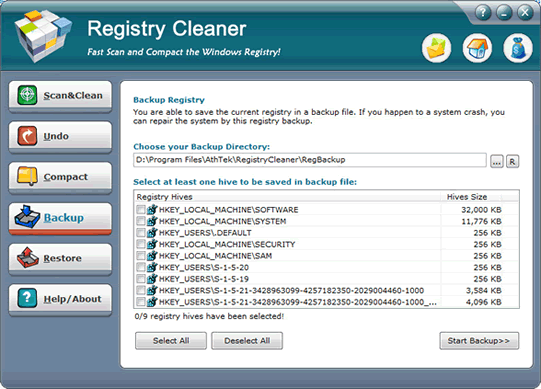
The backing up procedure isn't hard and time-consuming. Registrycleaner follows your directions and save all registry files besides merely reg to a pointed directory. The backup file will be named after the backing up time for easier reference in future use. Don't worry about losing important information by doing this; the intact registry will be copied completely to another file so that it can be rolled back securely when necessary.
5. Reliable recovery
System maintenance is a long-term task which can't be fixed once and for all, with your frequent use of computer, installations and uninstallations of software and other registry-related operations, the registry is going nearer and nearer to the emergency state and at one point sooner or later, your system will begin to slack again. However, if you did listen to our advice and made a backup of the "dream registry" in the past, congratulations, you have the time machine to travel back to the error-free moment!
Load up the registry cleanup tool and choose Restore tab directly, all the backup files you've saved will be listed here clearly. Select the cab file you want to roll back to and hit Start Restore button. Thousands of entries will be extracted from the backup file to replace the current buggy registry. Since Registrycleaner records all registry files in backing up process, there's no need to worry about missing vital fragments at all. The whole recovery will take you far less time than reinstalling the system or scanning and cleaning registry step by step. Reliable and efficient, isn't it?
Windows systems can't exist and function without registry database. A sound and slim registry guarantee the stable and speedy performance of your computer, which therefore boost your working efficiency and recreation fun. Equipped with double search engines and shown visually for easier operation, Registrycleaner is second to none in registry repair speed. Whether you are first time user or veteran consumer, you can find the suitable methods to tweak your registry and improve your system.
Scanning and cleaning clears away the wastes lurking in your registry so that endless application responses and occasional system errors won't irritate you again. Undoing offers a way to erase careless operations which might lead to system glitches. Backing up provides a reliable source to trace back to past modifications. And recovering acts as a trustworthy doctor to rescue your registry from emergency when nuisances arise. These features are designed to tackle all registry problems and function better if used comprehensively. The one-click-to-select-all function dramatically decreases the time needed for a complete registry repair compared with other similar registry boosters. Nevertheless, you need to activate Registrycleaner with a limited fee to enjoy all life use and upgrades. In the free trial version, some advanced functions are restricted and may influence your registry fixing time. So we strongly recommend you to get the full version for all the useful functions.
Moreover, we have a golden principle for your routine registry management. Take precautions against a buggy day! It's wise to get a backup of a healthy and clean registry at some crucial points during your computer's life span, for instance, when system is brand new with all necessary software installed, after loads of changes are made in regard to registry etc. Follow this rule and you will save a lot of time when a quick registry repair is needed. Good opportunities always wait for those who are prepared, so does registry repair goes. Better preparation means fewer procedures and less time. Why not take a minute or two to make a backup if it saves you a quarter or more in the next fix?
Also it can't be ignored that registry batch modification is, like installing and uninstalling software, related to some detail information changes between system infrastructure and applications. In this sense, some registry fixes like compacting and restoring require a system rebooting to make all modifications into effect. You can't simply skip these steps and hope that your registry fixes work. Spare a few more minutes to validate all changes according to application reminders, because you don't work to work in vain, do you?
Small and easily overlooked as registry is, it's an indispensable system component which enables Windows systems to know what their owners need, either it's an application access, file use or net surfing, registry entries are created, modified and deleted so long as you click your mouse. Get a speedy and reliable registry booster like Registrycleaner on your computer, it will guarantee the system performance and bring far more benefits than you expect.
 Facebook
 Twitter
 LinkedIn