Top Features
- Optimize Windows registry
- Best speed of all registry cleaners
- System emergency rescue
- Double engines inside Registrycleaner
- Remove thousands of registry errors
- Revert changes if there were mistake
- Make a backup file for registry
- Prevent system crashes
- Complete registry management
- Quality registry repair in minutes
- Easy to use registry cleanup tool
- Compatible with the latest Win OS
- Substitute for 'regedit' manually
Registry Backup
Acting as a crucial part to connect hardware with software on Windows systems including Windows Xp, Windows 7 and Vista, an orderly registry is a strong guarantee to computer's speedy and efficient performance. Under frequent use and changes, a registry will be caught up with redundancy and errors inevitably. To prevent these problems like system slowdown, error messages, black screen or Windows crash from falling onto your computer, you need to perform a registry repair on a regular basis or when it's required. A comprehensive registry cleanup tool is a must to achieve this function.
Registrycleaner offers various ways to tweak your registry quickly and reliably. Quick scanning picks up all the wastes and mistakes in registry, leaving them easy to be removed by customized cleaning function. Undoing provides you with more room to erase mistaken operations while compacting squeezes some extra space from the registry and further boosts your computer. But the most important link of a registry repair can be nothing but backing up.
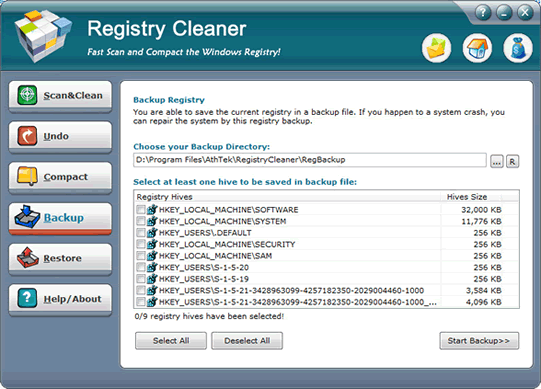
As both 32 bit and 64 bit registry cleaner, Registrycleaner can perfectly copy all the registry files besides reg merely to a backup file so that you can easily recover them in the future. The whole backing up process will take you only one minute or two, but it can save you much time and efforts when registry breaks down again someday. Make sure that the registry you will use to back up is both clean and slim, which will be the optimum version to trace back afterwards.
With a backup file of a healthy registry, there's no need to panic at all when registry problems show up once again. Load Registrycleaner and use its magic restore feature after locating the target backup file. Your registry will be replaced wholly with that functioning backup data source in no time! A click and a reboot, and your registry will be as clean and slim as before!
 Facebook
 Twitter
 LinkedIn