Top Features
- Optimize Windows registry
- Best speed of all registry cleaners
- System emergency rescue
- Double engines inside Registrycleaner
- Remove thousands of registry errors
- Revert changes if there were mistake
- Make a backup file for registry
- Prevent system crashes
- Complete registry management
- Quality registry repair in minutes
- Easy to use registry cleanup tool
- Compatible with the latest Win OS
- Substitute for 'regedit' manually
System Emergency Rescue
Windows system, ranging from Windows Xp, Windows 7 to Vista, is comprised of various software to guarantee the working and entertaining needs of different user groups. No matter you are the veteran users who use computer over ten hours a day in and off office or common users who apply the recreation usage more in leisure time, you can't deny the fact that registry data is always connecting with the software and under changes when you operate the computer. If we consider CPU as the brain of the computer's hardware, then registry is by all means the soul of software.
On the super highway of your computer processes, registry acts as a reliable navigator to receive passengers' demands and direct the software car to the correct road. If the registry signal fails or errors, it's likely that the cars will go in the wrong way and even crush, causing big chaos and causalities. When you experience slowing response of software, screen freeze, black screen or even rebooting, the registry navigator is probably sick. To rescue your computer out of system emergencies like this, you need a powerful registry cleanup tool!
A comprehensive and handy registry cleaner should contain all registry repair functions including scanning, cleaning, compacting, backing up and rolling back. More importantly, it must be fast and reliable to operate since like we mentioned earlier, any big confusion would lead to unpleasant error in the system if registry entries aren't handled properly. Fortunately, we've done some in-depths research and development and worked hard to bring an omnipotent registry booster to you! Registrycleaner can achieve all these functions quickly and professionally without causing changes to the rest computer documents. Your Windows system will be faster and more stable after a series of registry fixes. Excited and impatient? No hurries, we will teach you all those helpful rescue skills to remove system emergency.
Emergency one: computer speed slowdown
All of a sudden, you begin to doubt if you are running on a Windows 98 computer instead your real system. It takes forever to open up a program or file that you need eagerly and you want to throw your computer out of the room. The garbage files have been taken care of properly and you wonder how could lead to this. We are here to give you a possible reason: your system is full of redundant or confused registry entries and it is clueless towards your directions.
To eliminate this emergency, let the registry booster clean the entries for you. The tool automatically scans the whole registry and lists the results according to categories. You can choose to clean all the items scanned or tweak them group by group. In latter case, the registry cleaner creates more reg process files so that you can undo the changes respectively if careful and detailed notes have been taken. After the cleaning is done, all unnecessary files will be wiped out and other entries put in order. Also you can conduct the Compact step afterwards so as to release some extra space among the entries
A clean and slim registry will definitely help the computer run faster. And it's worth noting that scanning and cleaning fix is probably the most basic step in all registry repair procedures.
Emergency two: software error messages
The computer is playing jokes on you. Whenever you open a specific program, an error message showing that some files are missing and can't be found pops out and you have to turn if off etc. Sometimes the message pops one after another but the program just doesn't open. What to do now? Turn to Registrycleaner again for help!
These software errors are probably linked with wrong registry keys caused by improper uninstallation etc. The remaining black goats play tricks and intervene the other entry members to meet the right programs. To remove this annoying phenomenon, apply the scanning and cleaning strategy. Since the emergency is caused by entry errors as well like in emergency one case, this procedure is a surely a cure.
After sorting out the registry entries, you can take an extra step with the registry booster to further optimize the system. Compact the current registry to a smaller size and your system directory will have some extra space. Then back up the improved registry in case a quick rollback is needed in the future.
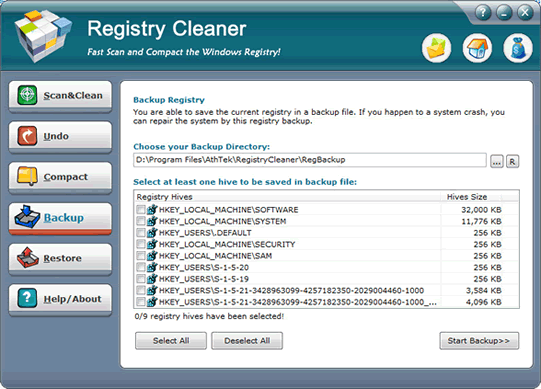
If you are in a hurry and don't have much time left, you can omit the compact and backup steps. The scanning and cleaning procedure is the basic rescue to error messages. However, if it's the first time you perform registry repair with the registry cleanup tool, it's still strongly recommended that you take a few more minutes to complete backing up procedure. Registrycleaner differs from other same-type products in its way to preserve registry entries. Instead of merely copying reg files, Registrycleaner records all files related to registry as a whole. In this way, you don't have to worry about losing any parts during the backup. The tool will achieve perfect rollback for you in the future.
With or without a backup, you won't be troubled with those software error messages again in the short future. You can release the tension for a while.
Emergency three: screen freeze, black screen and system rebooting!
You are finishing the designated works on the computer and suddenly the computer starts to freeze or even reboots after some time. We can understand how desperate you are now at this moment. Even if you have saved the file timely before emergency happens, you will still wastes a few minutes from rebooting and opening the file. To people who don't keep the habit of saving file from time to time, the consequence will be much more severe.
To fix these fatal emergencies and prevent them from happening, you need a comprehensive registry repair. Registrycleaner offers you quick fixes from its one-click-for-all feature so that you only need to spend short period of time faced with all fix procedures. Scanning and cleaning removes wastes and errors from your registry. Compacting cuts the registry size down and accelerates system's speed to some extent. Undoing offers a way to erase previous operations when necessary. Backing up and restoring acts as double protection to safeguard the registry' health. You can follow the steps and fix these serious registry issues easily by applying the registry booster if you are running its full version which activates all advanced features.
The procedures seem time-consuming at the first sight, but the time you spend on a complete registry repair will absolutely save you much more bulk of time in the future. Take this into consideration, and you'd better not slack down or omit one single step from the registry repair chain. Various fixes are designed for different functions and interlinked with each other to enhance the improvement effect.
Of course, there are other computer issues linked with registry, but the overall registry repair methods are listed above. You can use the features flexibly to meet the different needs in various occasions. Before we close up this lecture, there are some useful tips for you to tweak registry better:
1. Make a backup before a big registry repair.
If you aren't 100% sure that the computer problems are directly connected with the registry, we recommend you to preserve the current registry first. The importance of registry makes any ungrounded change dangerous because it might impair the system stability. However, if you are prudent and wise enough to make the use of backup feature granted by Registrycleaner, this won't be a problem to you at all. Even if your following operations err, you can still return back to the starting point quickly and safely without any harm.
2. Follow system hints to reboot timely
The registry repair concerns the deletion, modification, copying and recovering of registry entries. Like the system needs to be restarted after we successfully install or uninstall some programs, some operations like compacting and recovering require system rebooting as well. If you ignore the directions and skip the rebooting, the registry change you've made won't be validated. Therefore, you'd better strictly follow up the directions of Registrycleaner and reboot the system timely.
3. Make preparation for an emergency
Sound preparation will always bring examinees more confidence when they take their tests. It's the same in registry repair cases. If you keep good habit of backing up registry at a set basis and before and after registry repair, no registry caused emergency can lurk in your computer. Conversely, you may panic and feel clueless without enough preparation such as the latest backup file in the past month or quarter. Preparation matters because it offers an alternative way to fix your registry instead of the complex steps. If one step can replace the combined effects of three, why would you bother to spend triple time and efforts? So here we'd like to remind you again of the significance of backup.
Every Windows user has his/her unique system maintenance habits; we only provide some friendly tips in registry management aspect. With a comprehensive and professional registry booster like Registrycleaner and with consistent attention and efforts paid in registry tweak, you will become a registry management master sooner or later! Stick with the registry cleanup tool and stick to the registry routine control, your computer will run faster and more efficiently!
 Facebook
 Twitter
 LinkedIn